One of the most underestimated factors in SEO is the correct use of Google search parameters.
Given that Google remains the undisputed leader among search engines (92.78%), a basic understanding of how to use this site is essential.
Not only do these tools enable you to refine your search queries, they also save you time.
In this article, we will therefore look at useful applications of search parameters and their benefits for everyday use.
One of these examples relates to the restriction of search results.
Instead of entering a general term:

A simple search parameter such as "intitle:" can be used to filter the results significantly:
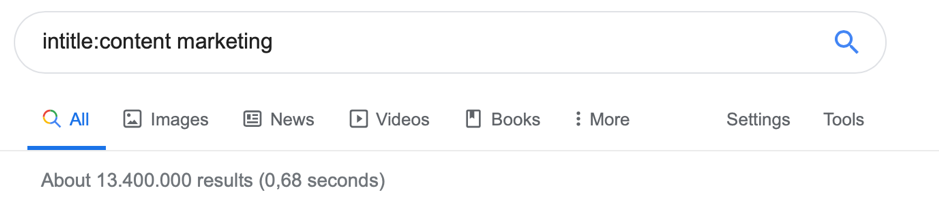
This reduces the number of search results displayed from over 6 billion to just over 13 million. Admittedly, this is still a large number of entries, but this operator ensures that even more relevant pages are displayed.
Let's take a look at some other helpful Google search parameters and their uses.
Let's start with the basic search operators.
{{divider}}
Google search parameters: Basics
- "Quotation marks"
One of THE operators that every SEO professional needs to know. This search parameter can be used to obtain results that contain exactly the desired term. This is therefore another way of narrowing down search results.
Example: "Content marketing strategies"
- #..#
Another essential command that allows you to view results from a specific time period only. You can also use this command for price ranges. It saves you from having to scroll through search results unnecessarily and narrows them down to suit your needs from the outset.
Example: iPhone 11 €800...€950
- –
Probably one of the simplest search commands that can be used: the minus sign.
This allows you to exclude certain words from your search. The minus sign must always be placed before the word to be omitted. Of course, you can also exclude several words at once in a search query to further refine the results.
Example: Shopping sites - WooCommerce
- AND
Another very simple operator. As the term suggests, you can use this to search for a specific combination of words.
Example: WordPress AND Shopify
- (All)Intitle:
This command can be used with or without the "All" suffix, offering a range of options. As you saw at the beginning of this article, it helps you to specify your search queries even more precisely. This means that the search results displayed are more relevant to your query.
Example: allintitle:Wordpress Guide
- (All)Inurl:
Similar to the command presented above, this Google search parameter helps you to further refine your query. With the help of these commands, you can ensure that the terms you are searching for are included in the URL. This search operator is therefore ideal for searching for guest posts, for example.
Example: inurl:guest article
{{divider}}
Google search parameters: Advanced
Now that we have covered the necessary basics of search operators in the first part, let's take it a step further in this part. The following search commands are no longer fundamental concepts, but they are all the more helpful in their application.
- Source:
The source command can be particularly useful if you want to use a trustworthy source to lend credibility to your content or statements. Specifically, this operator can be used in the Google News subsection to display only selected publications. For example, if you are writing a text on the topic of SEO 2020, it may be a good idea to include a quote from SEO experts such as Brian Dean or Neil Patel.
Example: source:backlinko
Even if the page you are looking for does not appear directly in the news results, for example because it is not a traditional publication medium, high-quality results will still appear in this context, giving you comprehensive insight into the subject matter.
- File type:
As the name suggests, this Google search parameter can be used to request the display of specific file formats. For example, when conducting relevant research on a topic and needing to find meaningful sources, this command can definitely simplify the search.
Example: seo filetype:pdf
Searching for PDF files often yields a series of research reports or findings that can serve as credible evidence for your content. Unlike many websites on the internet, these tend to be uploaded as PDF files rather than HTML.
- Related:
Here, too, the usefulness of the command is immediately apparent from its name. By entering this operator, you can find related or similar pages to a specific URL.
Example: related:airbnb.com
The use of the related command helps Internet users find and compare different providers in the same industry. Website operators can also benefit from this. On the one hand, this command provides an overview of the existing competition and their approaches to SEO. On the other hand, it helps us understand how Google categorizes our own website.

For example, we can see in the screenshot that even Tripadvisor is considered a relative of AirBnB in the eyes of the Google algorithm.
- site: .com + "Lorem ipsum“
In general, it can be said that combining different search parameters can produce very interesting results. For example, a combination of URL and "Lorem ipsum" search can be used in the course of an SEO audit to identify redundant pages.
Let me illustrate this with the following example:
Example: chip.de + "Lorem ipsum"
After entering this sequence, the search results immediately displayed several Chip subpages containing placeholder text.
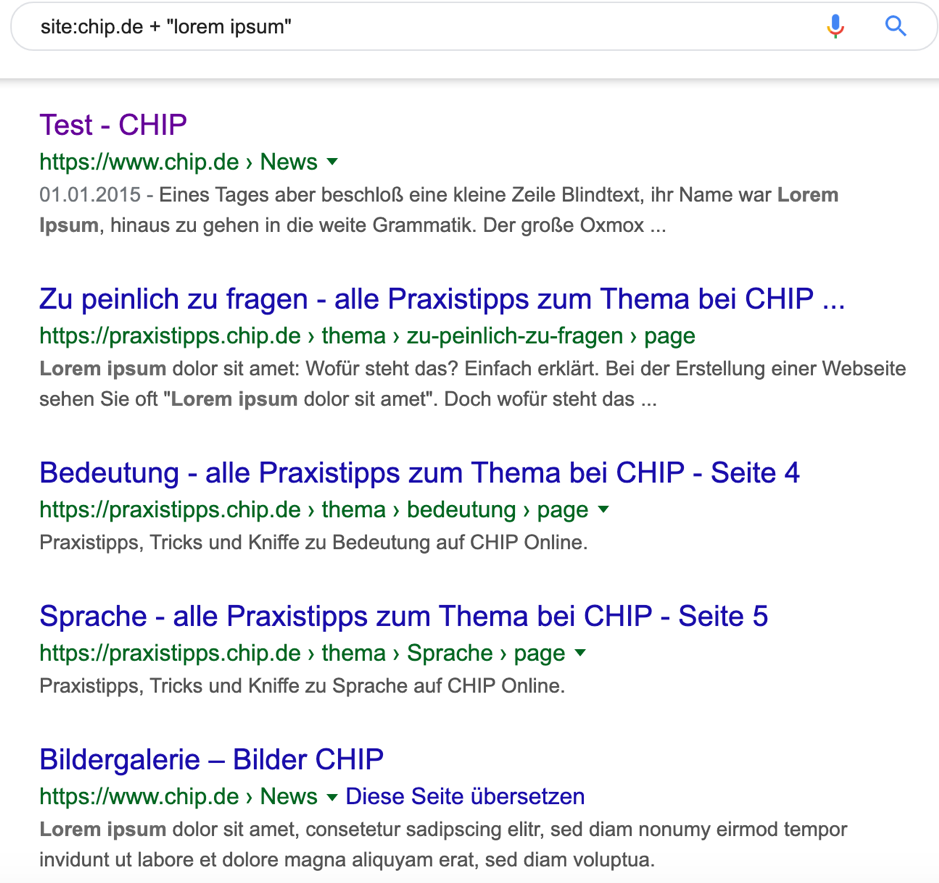
Worse still: these pages are publicly accessible and are therefore also taken into account and indexed by Google's crawlbot!

Such negligence can have undesirable effects in terms of SEO. There are two main reasons for this:
- Duplicate content: Due to the fact that "Lorem ipsum" is one of the most common placeholders on the entire internet, these sentences will appear on various pages. For Google's algorithm, this is duplicate content. This, in turn, has a negative effect on your page's ranking and definitely inhibits a potentially better ranking.
- Thin content: Here, too , Lorem ipsum texts work to your disadvantage—they simply have no meaningful or even helpful content. Such pages are classified as irrelevant by Google, and this rating also damages the domain in general.
Especially on websites with several thousand subpages, there is an acute risk that one or more pages will be made public even though they should be deleted.
So this is a one of manyto find and delete such pages.
{{divider}}
Conclusion
At first glance, the search parameters in the Basic section may seem bland and straightforward. However, it is definitely worth experimenting with them and, as you gain experience, discovering the best areas of application for these operators.
As already indicated, combining different search commands is particularly useful for linking individual properties in the best possible way.
In general, it is worth considering displaying and distributing these search operators in as many places as possible within a company. This gives even employees with little SEO expertise the opportunity to achieve maximum efficiency when using Google.