Anyone who publishes a text on the internet today without optimizing it for search engines is wasting a huge amount of potential. In addition to your regular readership, this can generate a lot of additional traffic. When it comes to SEO, there's no getting around keywords. But beginners often wonder which tools they can use to find them. That's why I've listed five tools that I like to use—two paid and three free.
- contentbird Keyword Planner
- Sistrix
- AnswerThePublic
- Keyword Shitter
{{divider}}
Find keywords with the contentbird Keyword Planner tool
As software for the entire planning, organization, creation, distribution, and analysis of content, the contentbird software includes a section for research. This is divided into two areas: the W questions and the keyword hunter.
Keywordhunter is a powerful tool that can be used to carry out almost all keyword planning. In the Keyword Research tab, you can enter a term, select the country and language, and generate keyword ideas.
- trend
- search volume
- Cost per click on Google Ads (CTC)
- Content Traffic Estimation (CTE)
- Contentbird Traffic Value (CTV)
- SEO difficulty.
You can see at a glance what potential a keyword has and decide whether you want to optimize for it. The list can be filtered, and you can narrow down the values. With a click, you can mark keywords and decide: Do you want to export them, monitor their ranking, or create a content idea directly? If a keyword is already assigned to a project or content, this will be shown in the list.

When you click on a keyword, additional information will appear on the right side of the screen: The first organic search results will be displayed, including estimated monthly visitors, backlinks, Facebook likes, and SEO difficulty.
In the Competitor Keyword Research tab, you get exactly the same information, but instead of a keyword, you enter a URL. The idea behind this is that you enter a competitor's domain and compare it. This gives you ideas for keywords that you could use.
The research section at contentbird also includes the W-question feature: Here, too, you enter a keyword and select a country. You will then receive a clear list of questions that are searched for in connection with the keyword. You can conveniently export the results list as an Excel spreadsheet or reuse it directly in the system. For each question, you can call up the corresponding result on Google or create a content idea.

{{divider}}
The paid tool Sistrix allows you to search for one of three values: a URL, a domain, or a keyword.
When searching for a domain, you can evaluate the following:
- SEO
- Overview
- visibility index
- Keywords
- Overview
- Keywords
- Keyword ideas
- Keyword groups
- Ranking changes
- Ranking distribution
- opportunities
- structure
- URLs
- URL changes
- directories
- host names
- countries
- search engine results pages
- competitor
- SERP snippets
- Featured snippets
- universal search
- Links
- Overview
- Links
- Link development
- New links
- Broken links
- link texts
- Linked pages
- opportunities
- Broken links
- Domains
- TLDs
- countries
- technologies
- Social signals
- Overview
- New URLs
- Top URLs
- Ads
- Overview
- Keywords
- Display URLs
- AdCopy
- competitor
- banner ads
That's a lot of information, which may overwhelm you. For complete beginners, it is therefore advisable to familiarize yourself with the tool and get help from others.
If you search for a keyword instead of a domain, it becomes much clearer. You then only have these evaluation points to choose from:
- Overview
- SERPs Desktop
- Mobile SERPs
- Ads Desktop
- Mobile Ads
- tools
- Similar keywords
- Related keywords
Some information is presented in clear diagrams, other information in lists. You can limit your search by time period and domain. In addition to suggestions for similar or related keywords, the tools also provide information on competition, search volume, trends, and CPC.

You can export the collected data and lists as PDF or Excel files, depending on the feature. However, you need to check which version you have subscribed to, as this determines how many exports are possible per month.
I think Sistrix is ideal if you want to conduct professional keyword research and analysis. However, the cost of the tool should pay off for you. Do you only want to conduct research for yourself, or are many terms meaningless to you? Then I recommend starting with a less complex tool for finding keywords.
{{divider}}
Free keyword research with Google
Most Internet users in Europe use Google as their primary search engine. That's why Google's algorithm is advanced and offers a lot of help. You can benefit from this in your research.
Google Analytics
If you or your company already works with Google Analytics, you can obtain useful information from the evaluations. If the architecture of your menu structure is sensible, you can learn a lot:
- Which existing pages and topic clusters generate a lot of traffic?
- Which keywords get a lot of impressions?
- Where do you spend a lot of money on ads?
- Where are visitor retention times and interest high?
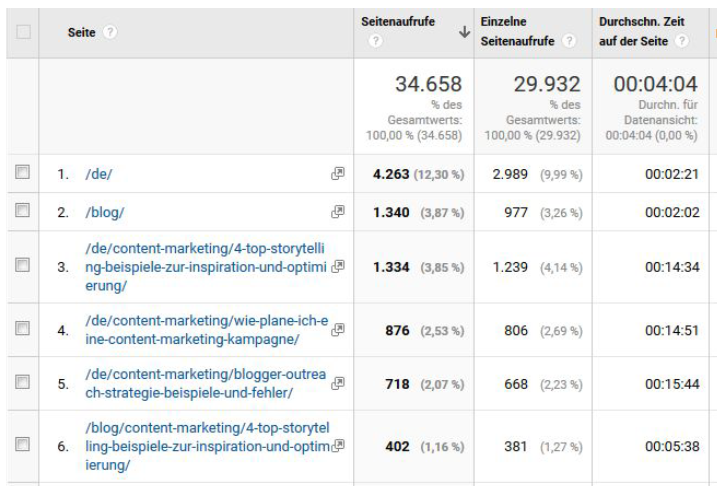
This will help you identify areas with potential or need for optimization and what is working well.
Google search results pages
Hard to believe, but true: search results for a single keyword can already provide you with a wealth of insights. You just need to know what questions to ask and what the answers tell you.
- How many overall results are there?
- Indicator of interest & competition
- How many advertisements are there?
- Indicator for sales potential & competition
- Which media formats are listed?
- Indicator of user search intent
- Which websites are listed?
- Indicator for customer journey and competition
- How extensive is the content?
- Indicator of quality standards & production costs
- What is the content about?
- Indicator for content design
You can gather all the useful information that is clearly presented in contentbird's Keyword Tool yourself. This will cost you time, but it will save you money.
Google Suggest
When you start typing a term into the Google search box, Google suggests longer versions of the keyword. This is not a coincidence, but is based on data. You can consider the suggestions as an indication of what people are searching for in connection with the keyword.

Tip: Use incognito mode or similar. Otherwise, your usual search behavior may influence the results.
Google Related Search
When you scroll down a search results page, similar search queries are suggested. From these, you can deduce the general search intent of other users. In relation to products, you can see whether there is a greater need to buy, obtain information, or find inspiration.

{{divider}}
AnswerThePublic as a free tool for finding keywords
I personally prefer to use AnswerThePublic to find long-tail keywords and inspiration. You enter a term in the search box, select the country and language, and press Enter. The tool recommends terms consisting of one or two words.
You will then receive the results either as a data list or visualization according to the following categorizations:
- Questions
- Prepositions
- Comparisons
- Alphabeticals (alphabetical keywords)
- Related

You can export the results as images or CSV files. Clicking on the individual results takes you to the Google results page for that specific long-tail keyword. Incidentally, the presentation of the results in data format is visually reminiscent of the W-question tool from contentbird.
I prefer to use the tool when I know what general topic I want to write about. Then I look for a perspective or central question. That's why I like to recommend it to others.
However, you should be aware that the site itself is entirely in English, even if you search for German keywords. You should have basic language skills to find your way around.
AnswerThePublic also offers a paid Pro version.
{{divider}}
Keyword research with KeywordShitter
Admittedly, the name of the tool is unusual, but it describes what it does well: it presents you with a huge amount of keywords. You enter one, press "Shit Keywords," and wait. The more time you give the tool, the more results it spits out.

To narrow down the results, you can define positive and negative filters. If you don't want to wait any longer, you can end the search with "Stop Job." You can export the results as a txt file.
I wasn't familiar with KeywordShitter before researching this article. However, I find the tool itself useful because it generates a seemingly endless list of keywords. Other tools would not output some of these keywords. However, you don't get any information about the relevance of the keywords, so you have to do further research yourself. I would therefore either use it purely as a basis for my keyword research or, conversely, as a source of inspiration when I have a lot of content for a keyword and am looking for related keywords.
As you can see, there are a whole range of tools available for finding keywords. The high-quality, paid tools in particular offer you lots of advantages and enormous added value. If it's worth it for you, I recommend investing in one of these tools. But even if you're a beginner or on a small budget, there's no need to despair. The free versions are less comprehensive or require more time, but they are a great way to get started. If necessary, you can always switch to a tool that costs money when it becomes relevant for you.